Product
- FootprintBid × ask on every level, delta, imbalances
- HeatmapResting liquidity through time, with memory
- CryptoBinance spot & perp, Bybit — same tools
- TradingDOM, OCO orders, account picker
- Chart demoThe crypto chart on a simulated market
- GEXDealer gamma, call and put walls
- VolatilityImplied volatility smile and skew
- Options flowPrints with the aggressor side when published
Learn
- Read a footprintThe starting point
- Order flowWhat the tape actually says
- Understand GEXGamma, walls, zero-gamma flip
- Options flowPremium, volume and classification
- Quant for beginnersFrom a hypothesis to an experiment
- All guidesSearch, paths, glossary, docs
Order flow software.
Futures & crypto.
Footprint charts, order-book heatmaps and DOM for futures and crypto — one desktop app, on the feed you already pay for.
- $9 for 14 days, then $20, then $29/mo · cancel any time from your account
- Read reviews on Trustpilot
- Your login stays yours: OS keychain, nothing via our servers
this scene is simulated · live data streams in the app only
01 — ORDER FLOW ON YOUR MACHINE · TWELVE SCREENS
Order flow on your machine.
Every screen of the desk, running here.
Twelve screens of the app, compiled from its own code and running here on simulated data. Pick one on the orbit.
Footprint chart
App code · simulated data
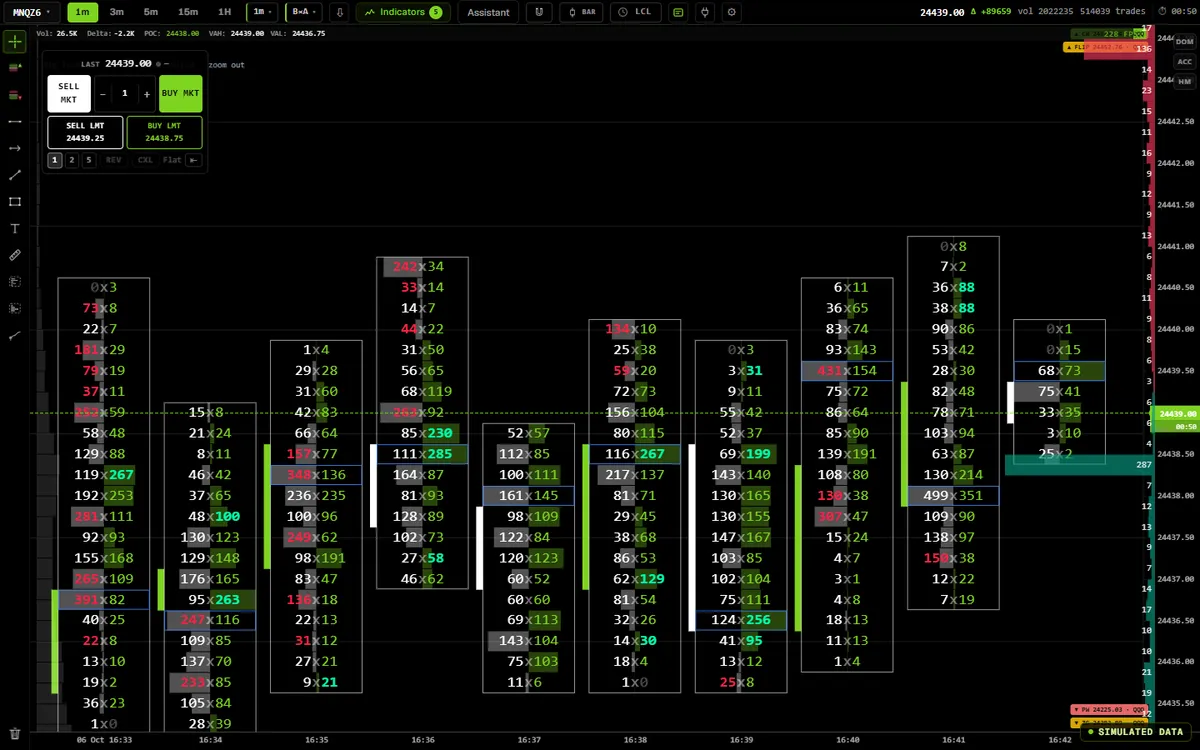
Bid × ask on every price, delta per bar and the session profile, on a simulated MNQ session. In the app it runs on your own feed.
See the Footprint pageHow to read the imprint, cell by cell
Every print lands in a price cell, bid on one side, ask on the other, tick by tick. The software is the chart — it runs on your Windows machine, on the prop firm feed you already pay for.
- 01
Bid × ask at every price
You read both sides of the same tick, never one blended volume bar.
see 23,848.25 - 02
Delta, level by level
Buyers minus sellers, printed on every price and carried across the whole session.
see 23,849.00 - 03
Imbalance and absorption
When one side stacks four to one and the price still refuses to move, someone is absorbing it.
see 23,847.25
| Price | Traded at bid | Traded at ask | Delta | Note |
|---|---|---|---|---|
| 23,849.00 | 1,180 | 412 | −768 | sellers on top |
| 23,848.75 | 688 | 1,704 | +1,016 | |
| 23,848.50 | 1,142 | 2,318 | +1,176 | |
| 23,848.25 POC | 1,905 | 3,260 | +1,355 | heaviest level · 5,165 |
| 23,848.00 | 1,486 | 2,394 | +908 | |
| 23,847.75 | 1,097 | 1,742 | +645 | |
| 23,847.50 | 842 | 1,578 | +736 | |
| 23,847.25 | 614 | 2,456 | +1,842 | 4:1 buy imbalance |
Liquidity heatmap
App code · simulated data
Resting size painted through time — walls that hold, get eaten or get pulled — with Big Trades bubbles and the DOM, on a simulated book.
See the Heatmap pageDepth of market (DOM)
App code · simulated data
Volume at bid and ask, delta and session totals at every price, on a simulated book. On this page, no order goes anywhere.
See the Trading pageOption flow
App code · simulated data
NQ options orders by premium and aggressor side, and the futures hedge flow they imply for dealers — sample data, no live feed.
See the Options Flow pageGEX & volatility
App code · simulated data
Net gamma by strike, call and put walls, the flip and the dealer regime, on a simulated QQQ chain computed in your browser.
See the GEX pageAI copilot
App code · simulated data
A demonstration conversation: Sen reads the chart, the calendar and your notes with read-only tools, and nothing applies without your click — orders stay yours.
See the AI pageNotes & knowledge graph
App code · simulated data
An Obsidian-style knowledge base: [[links]], tags, folders and a live graph, on a sample notebook. In the app your notes stay on your machine.
See the AI pageScripting: JavaScript, Python, C++
App code · simulated data
Press Run: the script executes in the app’s sandbox on simulated bars. JavaScript, Python or C++17; a script sends no real order.
See the Scripting pageBacktest & prop-firm challenge
App code · simulated data
A JavaScript strategy replayed bar by bar after costs on a simulated MNQ run, a walk-forward and a plain verdict — here No-go. It predicts nothing.
See the Backtest pageTrading journal
App code · simulated data
The session imprint, per-trade review, statistics and the notes you keep on each trade, on demonstration trades.
See the Journal pageNews desk & economic calendar
App code · simulated data
The wire, the calendar, central banks, a rates path and a speech room, on sample material. In the app, from free public sources.
See the News pageCrypto footprint
App code · simulated data
BTCUSDT prints with their aggressor side and automatic grouping, on a simulated tape. Binance and Bybit — analysis only, no crypto order routing.
See the Crypto pageNo account, no order, no live feed on this page — those stay in the desktop app.
Download for Windows02 — WHY THIS ONE
Nine things,
each one checkable.
What is different in this desk — one line each. Open any of them for the detail and how to check it.
-
One app instead of four
Footprint, heatmap, DOM, GEX, option flow, replay, journal and scripting — on one tick stream.
In detail
Footprint, order-book heatmap, DOM, GEX and option flow, plus replay, journal, scripting, backtest, news and 204 indicators — in the same window, on the same tick stream. Most desks reach that by stacking two or three subscriptions and a spreadsheet.
-
Three languages, one sandbox
Indicators and strategies in JavaScript, Python or C++17.
In detail
Indicators and strategies in JavaScript, Python or C++17 — Python on a bundled interpreter, C++ compiled by a real Clang toolchain to WebAssembly, downloaded once. The usual choice elsewhere is one vendor language: C#, Java, ACSIL, Pine. Backtests run JavaScript and Python; C++ runs as indicators and in replay.
-
A backtest that rehearses your challenge
Your trades, after costs, through drawdown, daily-loss and consistency rules.
In detail
Bar-by-bar replay with costs and walk-forward folds — then the same trades run through configured evaluation rules: static or trailing drawdown, daily loss, consistency, minimum days, payouts. Monte Carlo by permuting your own days. Conditional on what you feed it; it never promises a pass.
-
Copilots with something to look at
They read what is on the chart and propose actions. Nothing applies without your click.
In detail
Not a chat box beside the chart: the chart assistant reads timeframe, indicators and the prints on screen and proposes typed actions; Heatmap Intelligence explains a zone from the events it recorded; the script assistant reads your draft. Claude, Mistral, DeepSeek or a local engine. Nothing applies without your click; nothing trades.
-
You choose when it runs
Manual orders by ticket. Strategy automation is paused on real accounts.
In detail
Place manual orders with the ticket. Strategies run on the demo account in Replay and in backtests; automation is paused on real accounts.
-
The crypto desk gets the same tools
Binance and Bybit with the same footprint, heatmap, scripts and copilot — analysis only.
In detail
Binance Spot, USD-M Perp and Bybit order-book history, with the same footprint, heatmap, drawings, indicators, scripts and copilot as the futures chart — a grouping step chosen per pair, real bid × ask from trades, analysis only.
-
A heatmap that remembers
Wall memory, pinned levels, and absorption, refill and sweep candidates with their evidence.
In detail
Level inspector — displayed quantity, age, executions, adds and pulls with their curves — wall memory, pinned levels, absorption / refill / sweep candidates with the observations behind them, exported to the journal in one click.
-
It reads the feed you already pay for
Rithmic direct, or Databento on your key. No second data bill.
In detail
Your Rithmic login, direct, or Databento on your own key. We do not resell market data, so there is no second data bill from us.
-
Native, and the price is checked
It renders tick by tick on your machine. Nine rivals’ prices, dated and linked, just below.
In detail
A desktop app that renders tick by tick on your machine — Windows, plus macOS and Linux in beta. One flat plan. Nine platforms read on their own pricing pages, dated, each line linked to its source: the table is right below.
03 — THE PROOF, CHECKABLE
Compare the software,
then read the reviews.
One claim, one axis: the monthly price. Every figure was read on the vendor's own pricing page on 19 July 2026 and links back to it. Check it before you believe it, ours included.
$29/mo
Senzoukria · one plan, every screen
$30 a month under the median
up to $360 a year less than the median
Median of nine footprint-capable desks on prices read on 19 July 2026: $59, from $35 to $99. Software only — market-data fees are excluded on every line, ours included.
- Senzoukria $29One plan — footprint, heatmap, DOM, GEX
- GoCharting $35CME Futures package
- Sierra Chart $36Package 5
- MotiveWave $49Order Flow Edition
- ExoCharts ≈$56Desktop Pro · €49
- NinjaTrader $59Order Flow + add-on
- ATAS $69.95Pro
- Quantower $70ALL-IN-ONE
- Bookmap $99Global+
Jigsaw daytradr: $579 once — a lifetime licence, no monthly plan, so not on this axis.
Line-by-line notes and sources
- Senzoukria One plan — footprint, heatmap, DOM, GEX — $20/mo on the annual cadence. Reads the feed you already pay for, Rithmic direct, so there is no second data bill from us.
- GoCharting CME Futures package — ≈$29 on annual, and real-time CME data is included — rare at this price. No liquidity heatmap: DOM only. Vendor page ↗
- Sierra Chart Package 5 — Standard at $26 has no footprint — Numbers Bars need an Advanced package, and the Denali depth feed needs Package 11+. A realistic CME depth setup lands near $59.50. Vendor page ↗
- MotiveWave Order Flow Edition — Or $595 as a lifetime licence. The Standard tier at $24 and the free Community edition exclude every order flow tool. Vendor page ↗
- ExoCharts Desktop Pro — Priced in euros — the dollar figure moves with the rate. Crypto-first: CME futures need a separate dxFeed subscription. Vendor page ↗
- NinjaTrader Order Flow + add-on — $0 if your NinjaTrader brokerage account is funded — the add-on unlocks on every plan. If your capital sits at a prop firm or another broker, it is $59, and L2 depth data is extra either way. Vendor page ↗
- ATAS Pro — $39.95 billed annually. The much-quoted Plus tier at $24.95 streams crypto live but delays futures by 15 minutes — not usable for live order flow. Vendor page ↗
- Quantower ALL-IN-ONE — ≈$49 on annual. The free tier has no footprint and no heatmap. Sometimes free through partner brokers — worth asking yours. Vendor page ↗
- Bookmap Global+ — $79 billed annually. Global at $49 has the famous heatmap but no footprint column. CME data is extra, $34–$119 depending on the provider. Vendor page ↗
- Jigsaw daytradr Lifetime licence — No monthly plan, so no bar — putting a one-off licence on a monthly axis would be a lie about the axis. The $50/month often quoted is the live order-execution add-on, not the licence. Vendor page ↗
How these prices were checked
How to check this. Every price above was read on the vendor's own pricing page on 19 July 2026, and every line links back to the page we read. Vendors change tiers without notice — confirm before you buy, including ours.
What is not counted. Market-data fees, exchange fees and broker commissions. They are billed by the exchange, they are identical whoever sells you the screen, and adding them to one side only is how a comparison stops being one.
What this does not say. That ATAS, Bookmap or Sierra Chart are bad tools — they are the reference platforms, and they cost what a bigger company costs. The only claim here is the one on the axis: the price.
04 — HOW IT CONNECTS
Your login, your machine,
your click.
Your feed runs on your machine and your credentials stay in its keychain. Manual orders are yours, and strategy automation is paused on real accounts.
Rithmic direct
Native R | Protocol — no NinjaTrader in between. The login your prop firm issued, for the tape and for your own orders.
no automation on real accounts
Crypto
Binance spot and USD-M perp trades and depth, Bybit order-book history — no account, no API key; analysis only.
never holds a key of yours, never routes a crypto order
Rules vary by firm and account: check them before you trade. All product and company names are trademarks of their respective owners. Senzoukria is independent — not affiliated with or endorsed by any of them.
14 days for $9.
$20, then $29/mo.
One plan, everything in it. Prepay to pay less per month — and your rate never rises while the subscription stays active.
- Cheapest for you Monthly $9 for 14 days $20 the first month, then $29 $49 a month from v1.0 $348 over 12 months
- Cheapest for you 3 months $75 every 3 months $25 a month · −14% $129 from v1.0 $300 over 12 months
- Cheapest for you 6 months $138 every 6 months $23 a month · −21% $239 from v1.0 $276 over 12 months
- Cheapest for you Annual $240 a year $20 a month · −31% $490 a year from v1.0 $240 over 12 months
Stripe · first payment refunded within 14 days · cancel any time from your account · market-data fees separate
Founding prices end at v1.0. Subscribe before and you keep your rate as long as your plan stays active.
What happens the day you stop
If you stop
- Day 14
- your 14 days end, the first month renews at $20, then $29
- nothing else changes — same app, same everything
- You cancel
- access runs to the end of the period you paid for
- any time from your account, never billed again
- Access ends
- the desktop app stops opening
- no read-only mode — the app simply stops
- Your data
- account data is kept as our privacy policy describes
- what is on your computer stays there, nothing is exported to us
- You come back
- subscribing reopens everything instantly
- before v1.0, at the founding rate again; after v1.0, at the list price of the day
Everything that is included
Included — one plan, no add-ons, no seats to buy
- 204 indicators across 14 families
- 4 chart views — footprint, heatmap, DOM, option flow
- Rithmic direct (R | Protocol) — no NinjaTrader in between
- Crypto live feeds: Binance, Bybit, Deribit (personal use only)
- Replay — one recorded session, tick by tick
- Trading journal with session screenshots
- Scripting — your own indicators and strategies
- News and economic calendar
- 2 machines — desktop and laptop
Priority support on Discord. No setup fee, no data add-on, no market sold separately.
Billing questions
Five questions people ask before paying
What exactly is the $9?
Your first 14 days, in full: every feature, no limits. It is charged once when you start. On day 14 your first month renews at $20, then $29 a month, unless you cancel before. Yes, that means a card up front: the 14 days are paid, not a trial, and the first payment is refunded if you ask within 14 days.
Monthly or annual — which should I take?
Move the slider above; it answers with your own horizon. The short version: monthly costs less for the first — months, and annual takes the lead in month —. After that annual saves — a year — — a month. If you don't know how long you will stay, take monthly: switching later costs nothing.
Will the price go up?
For new subscribers, yes: the list price becomes $49 a month when v1.0 ships. For founding subscribers it never does — you keep $29 a month for as long as your subscription stays active. Cancelling later means re-subscribing at the list price.
Do I pay for market data on top?
Not to us. The app reads the feed you already have, your Rithmic credentials directly, so there is no second data bill on our side. Exchange fees stay between you and your broker, exactly as they do on every platform in the table above. Crypto feeds (Binance, Bybit, Deribit) are free and need no broker at all. Deribit options are for personal use only, under Deribit's terms.
How is payment handled, and can I cancel?
Every payment runs through Stripe — we never see or store your card, and the checkout is fully PCI-compliant. Cancel any time from your account page: you keep access until the end of the period you paid for, and you are never billed again.
Questions, answered
Everything we get asked twice. Anything else — ping us.
On the direct Rithmic connection the app speaks R | Protocol straight to the gateway — no middleman server at all. A cloud orderflow tool routes the tick through its own servers before it reaches your browser; Senzoukria renders on the machine that receives the tick.
All major CME / CBOT / NYMEX / COMEX futures: ES, MES, NQ, MNQ, RTY, YM, GC, MGC, SI, CL, MCL, NG, ZB, ZN, ZC, ZS, 6E, 6B, BTC, ETH and ~30 more. Plus crypto pairs on Binance, Bybit and Deribit (spot + perp + options). The full list of contract specs lives in the app — adding a contract is a one-line change for us.
Windows 10 or 11, 64-bit (Windows installer, about 60 MB). macOS in beta: one universal .dmg for Apple Silicon and Intel — first launch needs Settings → Privacy & Security → Open Anyway (not Apple-notarized yet). Linux in beta: AppImage (auto-updates) or .deb, needs gnome-keyring/KWallet running to store broker credentials. On macOS and Linux, connect via Rithmic direct or crypto — the NinjaTrader/Quantower bridges are Windows-only.
Each candle splits into price-level cells. Each cell shows aggressive buy volume vs aggressive sell volume with delta (buy − sell) highlighted. Imbalances (one side dominating 3:1 or more) are flagged. Cell size, palette and threshold are user-configurable. On the direct connection, volume is built from the exchange tick stream.
Yes, up to 2 machines (PC + laptop, same account). The license tracks active machines via hardware fingerprint and a 7-day heartbeat. Switching devices is automatic — no re-activation step.
No. Point-and-click throughout. Setup is entering your broker login. A 5-step walkthrough lives at /download.
Yes — a free assistant is available on the site, on the home page and in the dashboard; in the desktop app, copilots read your actual context (chart, heatmap zone, scripts, backtests). Ask the site assistant anything about the platform, connecting your broker feed, or the order-flow concepts themselves — footprint, delta, imbalance, absorption, CVD, liquidity heatmap, GEX — and it answers in whatever language you write in. It is a reading aid, not a signal service: it explains what the data means, it does not predict price and it gives no financial advice, and it never places trades.
Still stuck? Ping us
06 — YOUR MOVE
Nine dollars
to find out.
The first 14 days are $9, then $20 the first month and $29 after. Cancel any time from your account. If it does not read your feed the way you expected, you have lost the price of a coffee and an evening.
- Read reviews on Trustpilot
- Rithmic direct or Databento on your own key
- Manual orders: no automation on real accounts
Written answers, real drawings — every chart below is rendered in your browser, live, on a canvas.