Product
- FootprintBid × ask on every level, delta, imbalances
- HeatmapResting liquidity through time, with memory
- CryptoBinance spot & perp, Bybit — same tools
- TradingDOM, OCO orders, account picker
- Chart demoThe crypto chart on a simulated market
- GEXDealer gamma, call and put walls
- VolatilityImplied volatility smile and skew
- Options flowPrints with the aggressor side when published
Learn
- Read a footprintThe starting point
- Order flowWhat the tape actually says
- Understand GEXGamma, walls, zero-gamma flip
- Options flowPremium, volume and classification
- Quant for beginnersFrom a hypothesis to an experiment
- All guidesSearch, paths, glossary, docs
The ticket, the DOM,
and your own click.
Send manual orders from the chart on the selected account. Strategy automation is paused on real accounts. Since v0.80, orders run on their own lane, stale entries are refused and protection follows the position as soon as it fills.
- Stale entries
- > 1.5 srefused, never sent late
- Software share
- ≈0.9 msper order, network excluded, v0.80, on our bench
- Accounts
- Pickerseveral evaluations on one login
Windows · macOS and Linux in beta · market data billed by your provider
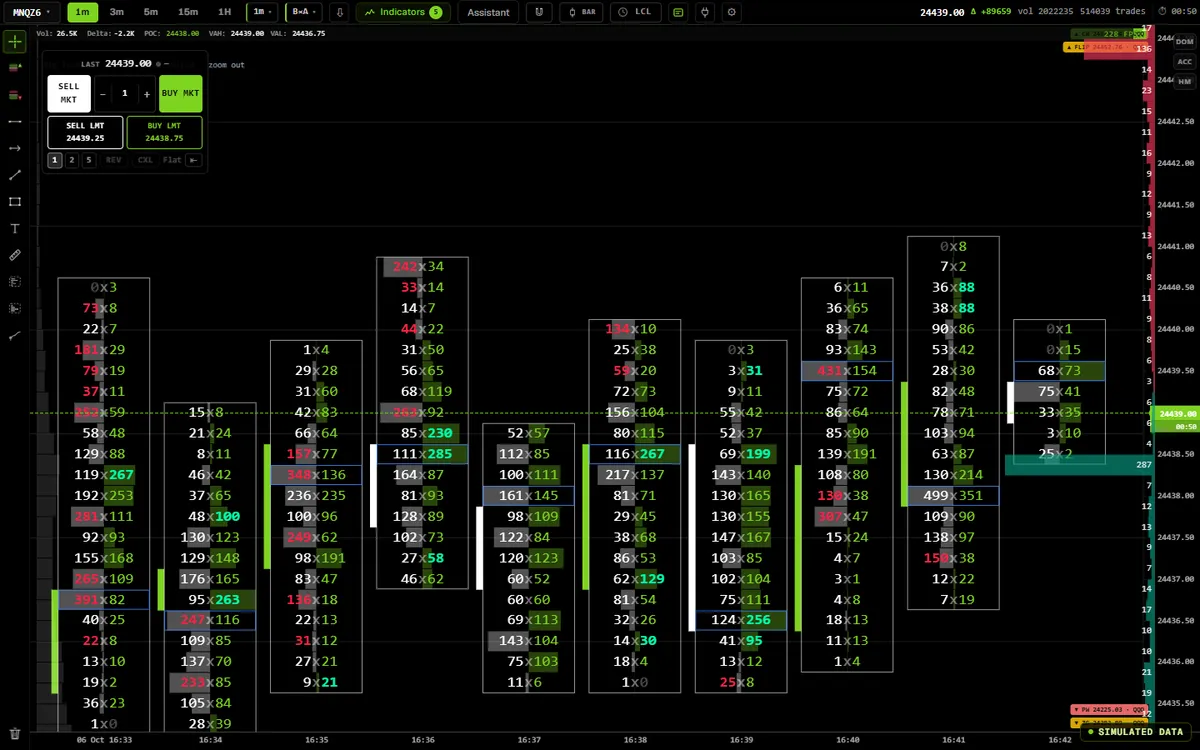
The app’s own code, compiled for the web and fed by a simulator. In the app, the same screen runs on your feed.
- 0.87Demo account: fees per contract, net P&L, click to trade in the DOM
- 0.86Rithmic free trials connect through R | API+ (Windows, market data only)
- 0.84Stops, targets and exits sent at once, never refused as stale
Read the ladder
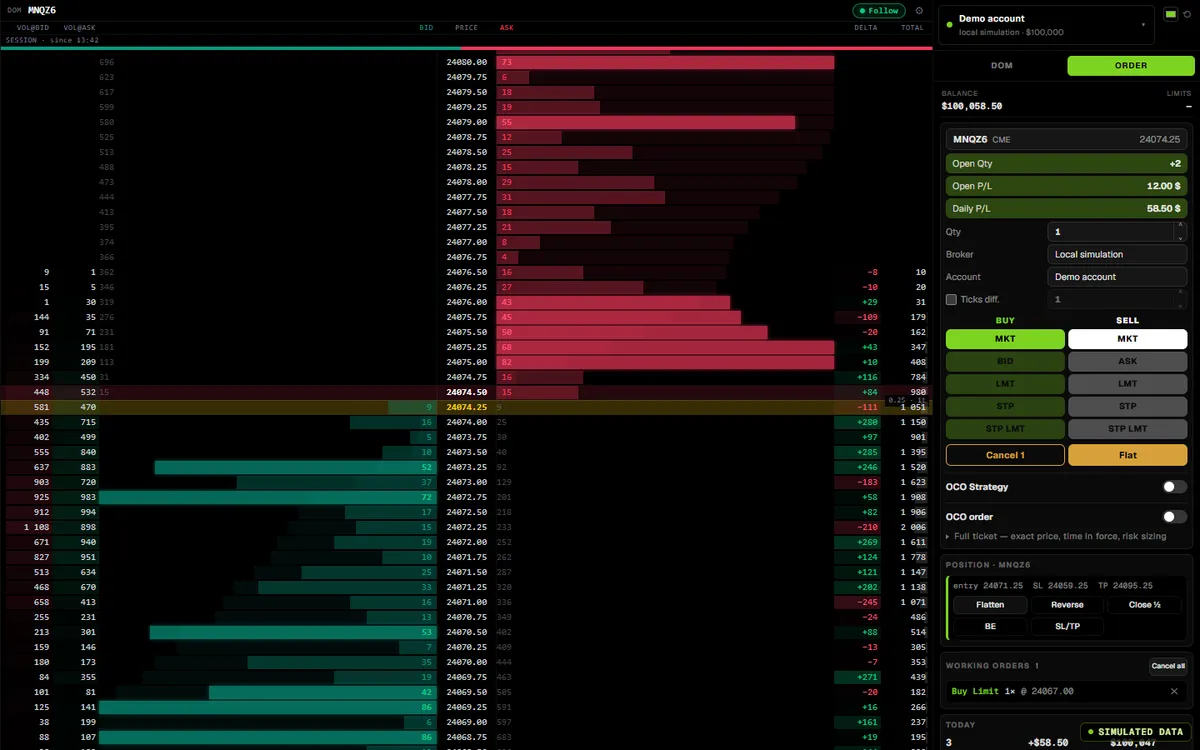
v0.88.1 of the app, on a simulated MNQ book.
The app’s DOM and order panel, v0.88.1, on a simulated book: volume at bid and ask, delta and session totals at every price. Click the screen to use it; move the pointer away and the page scrolls again. No order leaves this page.
Place and manage
On a compatible Rithmic account, when your firm allows it.
- Order ticket and DOMMarket, limit, stop, from the compact order panel or the ladder.
- Order lines on the chart0.80Stop and target follow your hand; the last price you release is the one sent.
- OCO in the chart dock0.80Breakout, range, or target plus stop. The link is held by the app: if it closes, both orders stay working, unlinked, and the banner says so.
- Protection follows the positionStop and target move to the new size as soon as an add fills; a late confirmation never shrinks a stop.
- Demo account0.87A simulated account with fees per contract and a net P&L, and click to trade in both DOMs. Nothing is sent to your broker.
Exit and timing
Speed where it matters, refusal where it is safer.
- Flatten on a priority laneA position back to flat counts as success. An unknown outcome never sends a second exit on its own; the banner names what is left.
- Late entries refusedAn entry sent more than 1.5 s after your click is refused, never sent late. The data delay is measured and shown next to the last price.
- Order pingThe median order ping is shown in the dock; Nagle is off on the order connection.
Accounts and rules
Which account gets the order is a choice you make, visibly.
- Account picker0.80One Rithmic login with several evaluations shows a picker in the trading dock, the Desk and Account, remembered per connection.
- Safe switchSwitching is refused while the account you leave has a position, a working order or a Flatten in progress.
- Order rules in the coreDaily loss, trading hours (New York time) and a contract cap, judged account by account, enforced by the app’s core, not only on screen.
- The connection you connectedAccount feed and orders always follow the Rithmic connection that is connected.
Automation
Paused on real accounts.
- Demo accountStrategies run on the demo account in Replay and in backtests. No strategy sends an order to a real account.
- The AI does not tradeSen and Jarvis have no tool to place orders or touch accounts or connections.
Not available yet
Said before you rely on it.
- Copy tradingCopy trading is not available yet. You can prepare groups in Account; no order is copied to another account.
- Native Rithmic bracketsBrackets and OCO placed at Rithmic with the entry stay disabled; the app holds the OCO link itself.
Where the data comes from
Your login or your key. Data, history and orders kept apart.
| Source | Orders | Accounts |
|---|---|---|
| RithmicBroker or prop-firm login | YesCompatible accounts, firm rules apply | PickerSeveral accounts on one login |
| Databento CMEYour key | NoData only | — |
| Binance · BybitCrypto | DemoSimulated demo account only | — |
Compatibility depends on your Rithmic access, your account’s entitlements and your firm’s rules. Confirm them before trading. On the R | API+ route, used for free trials on Windows, the app receives market data only.
How to read it
The tool is here. The theory lives in the free guides.
Works with
One app; every screen reads the same state.
- FootprintOrder lines and OCO on the chart you read.
- Replaynew pageRehearse on a simulated evaluation account, live orders off.
- ScriptingStrategies on the demo account in Replay and in backtests.
- Journal & notesYour trades, imported from the connected account.
Questions
The same list feeds the page and its structured data.
Is the DOM on this page live?
No. It is the app’s depth-of-market renderer on a simulated book, computed in your browser. No order can be placed from this website.
Can Senzoukria place real orders on my broker?
Yes. Supported broker connections provide manual order entry. Strategy automation is paused on real accounts. Permissions vary by broker and prop firm. Confirm the rules for your account.
Do my trades feed the journal?
Yes. The journal imports your trades from the Rithmic connection that is connected — entries, exits, size, P&L — and the day statistics count the active account only. You then annotate, tag and review them.
What do the account rules do?
You set a daily loss limit, trading hours (New York time) and a contract cap; the app’s core enforces them on every order, account by account, not only on screen — an exit always passes. To rehearse inside prop-firm rules without risking an evaluation, Replay runs a simulated evaluation account and the backtest simulates challenge rules on your trades.
Is copy trading available?
Not yet. The panel is visible in Account and you can prepare groups, but arming and actions on accounts stay disabled: no order is copied to another account.
It is in the one plan
No add-on, no tier.
$9for 14 days
then $20 the first month and $29 a month after · every tool included · cancel any time