Product
- FootprintBid × ask on every level, delta, imbalances
- HeatmapResting liquidity through time, with memory
- CryptoBinance spot & perp, Bybit — same tools
- TradingDOM, OCO orders, account picker
- Chart demoThe crypto chart on a simulated market
- GEXDealer gamma, call and put walls
- VolatilityImplied volatility smile and skew
- Options flowPrints with the aggressor side when published
Learn
- Read a footprintThe starting point
- Order flowWhat the tape actually says
- Understand GEXGamma, walls, zero-gamma flip
- Options flowPremium, volume and classification
- Quant for beginnersFrom a hypothesis to an experiment
- All guidesSearch, paths, glossary, docs
It reads your context,
and never predicts.
Sen, the agent inside the app, reads what you see through read-only tools: the chart, the account, the calendar, the news, your backtests and scripts. It describes what is measurable and stops where measurement stops. The sources of an answer are written by the app, not by the model. With no key, SenLocal answers by default; with your key, Mistral, Claude or DeepSeek, or a model on your own machine.
- Engines
- No key neededSenLocal by default; Mistral, Claude, DeepSeek, local
- Sources
- App-writtenfrom the tools actually used
- Orders
- Noneno order, account or connection
Windows · macOS and Linux in beta · market data billed by your provider
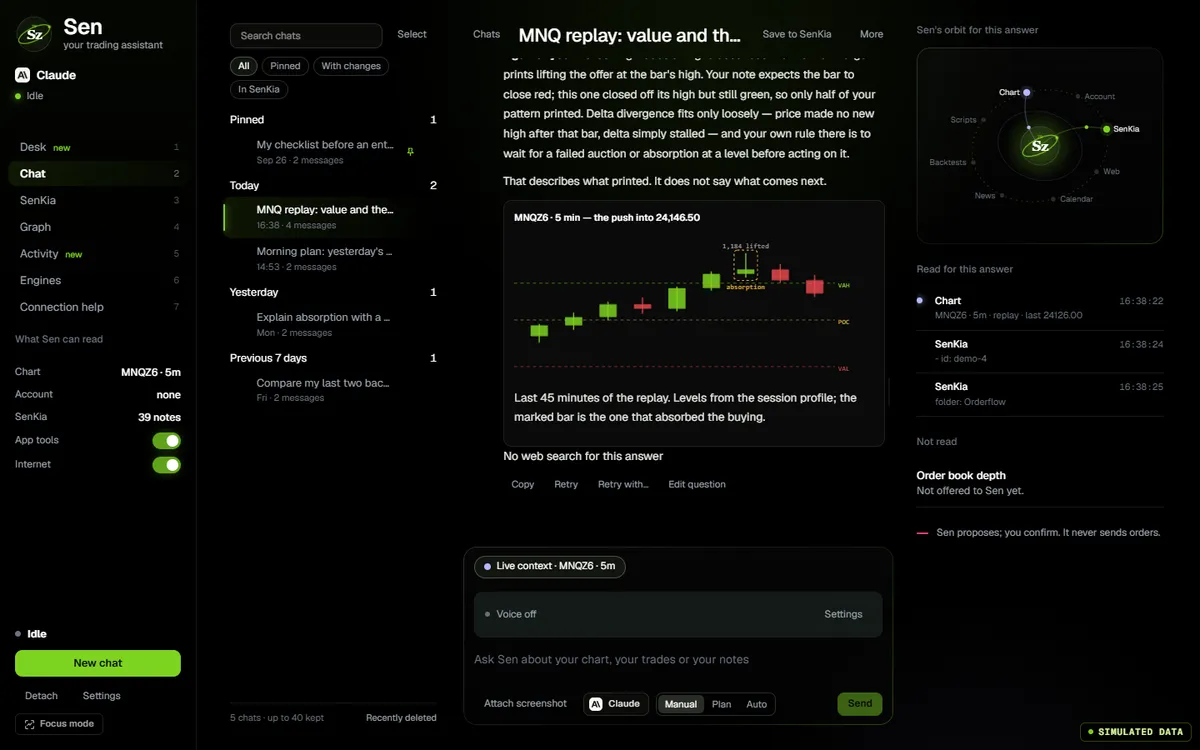
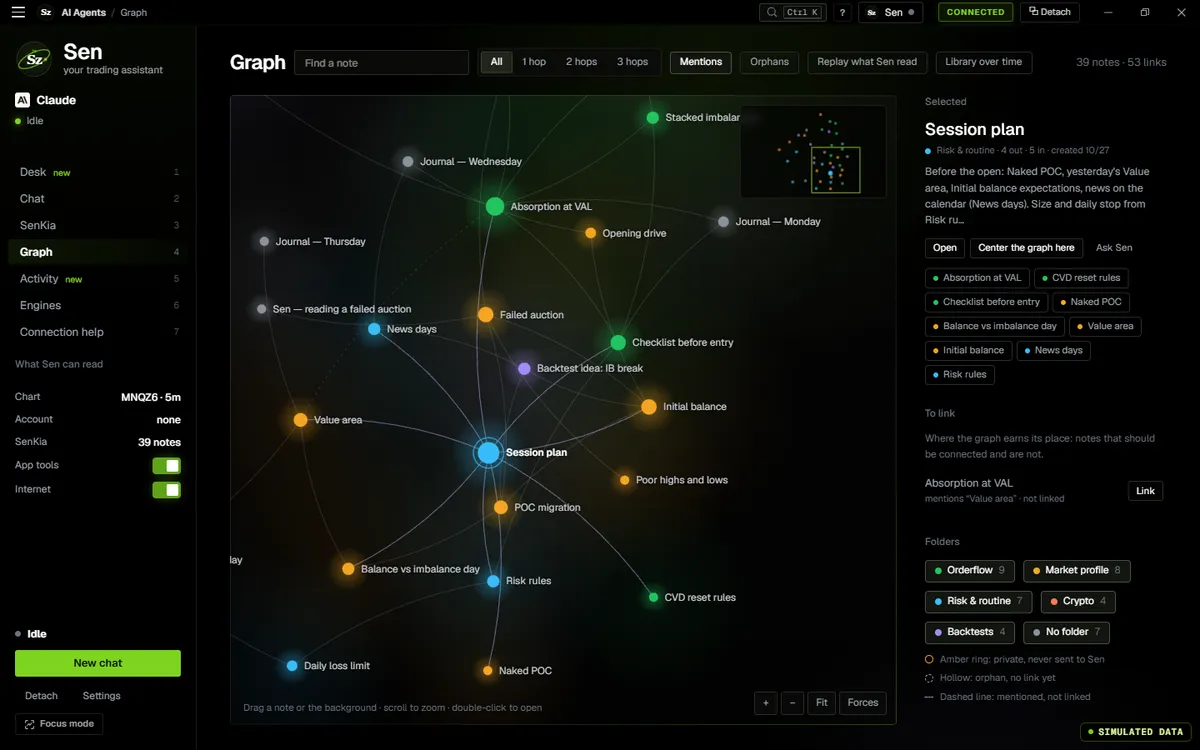
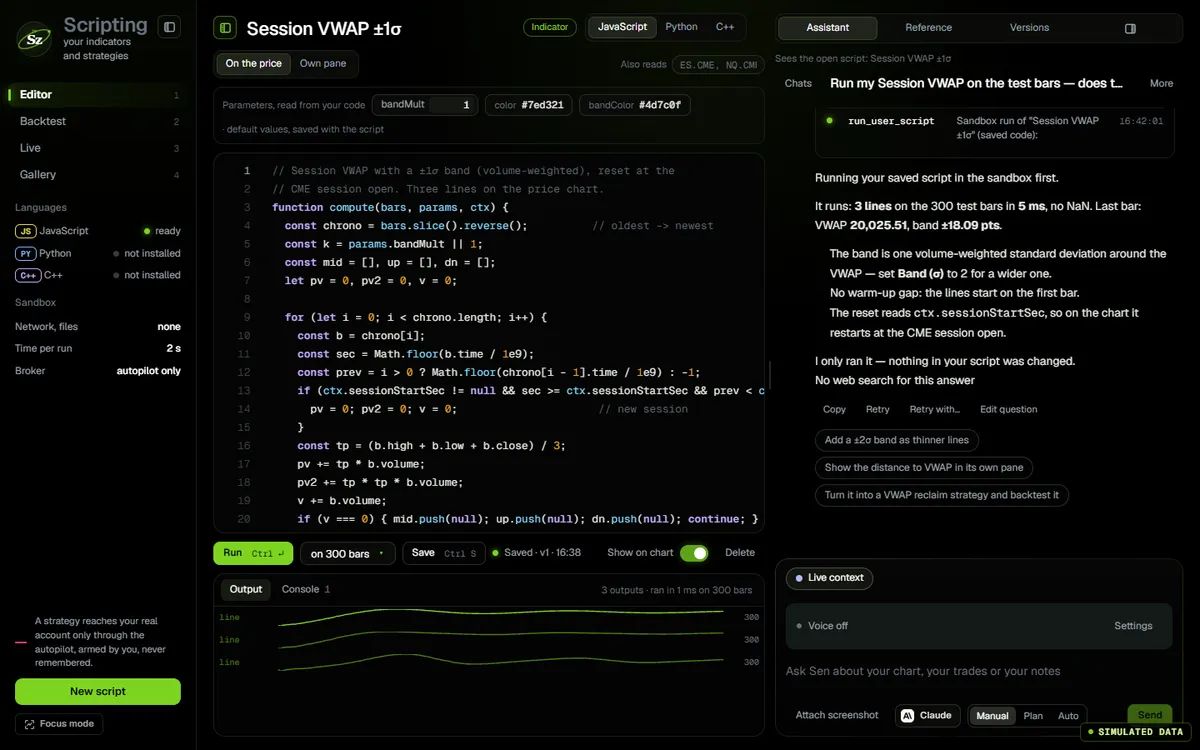
The app’s own code, compiled for the web and fed by a simulator. In the app, the same screen runs on your feed.
- 0.88SenLocal holds a conversation; a missed request is shared only if you say yes
- 0.87Sen speaks with a natural voice, Windows voices as fallback
- 0.85SenLocal: Sen and the chart and heatmap assistants answer with no key
Ask Sen
v0.88.1 of the app, answered by SenLocal with no key.
The app’s Sen screen, v0.88.1. Click the screen to use it; move the pointer away and the page scrolls again. Type a question: SenLocal, the keyless engine of the app, answers in your browser and cites its source. It refuses orders. No model and no key are used on this page.
Reads, then answers
Read-only tools, cited by the app.
- Read-only app toolsChart, calendar, news, backtests and scripts, through tools that can only read. Online engines never receive live CME or options figures, and read your account only after your OK.
- Sources written by the app0.80The sources of an answer come from the tools actually used. Ask “which source did you use?” and the app answers, with the exact addresses.
- Web and research papers0.80Web search and page reading, and academic search on arXiv, OpenAlex and Semantic Scholar. SSRN is never queried; its DOI is offered instead. A PDF is linked, never read.
- ScreenshotsPaste one; a follow-up question stays on a model that reads images.
Acts with your approval
Manual, Plan or Auto.
- Approval cardsA change to the app, a note or a script arrives as a card you accept or refuse.
- Manual, Plan, AutoWith a model, Auto lets pages, panels and an indicator Sen just wrote through without a card, three at most; a strategy keeps its card. SenLocal in Auto applies a chart plan at once, undone with one Ctrl+Z.
- No trading toolsSen cannot place orders or touch accounts or connections.
Writes code
Checked before it is created.
- Scripts checked in the sandbox0.80JavaScript, Python or C++, run in the real sandbox before they are created. Failure rate 95 % → 5.6 %, on our bench.
- The language you asked forRespected, C++ included, and checked on the answer.
- Code explainedConcept, how it works, choices and limits.
Jarvis, by voice
Talk to Sen from any screen.
- Three ways to talk0.81Click, push-to-talk (F8 by default; an order shortcut keeps its key) or hands-free.
- The mic never opens on its ownVoice is off by default. The red dot only shows while the mic actually captures.
- Local speech recognitionOn Windows, your voice is transcribed on your PC; the model downloads only when you click (about 60 MB, or 488 MB for the precise one). Mistral transcription with your key is an explicit choice.
- Read aloud, with consentAnswers are read by Senzoukria’s voice service, with your consent. When it is unavailable, or if you keep everything on this computer, Windows voices read them.
Copilots where the question starts
Each with its own evidence.
- Chart copilotProposes timeframe, indicators, parameters and templates; nothing applies without your click.
- Explain this zoneOn the heatmap, only the zone’s recorded evidence goes to the engine you chose.
- SenKiaLinks your notes and suggests how to grow the graph; private notes are never read.
- Backtest copilotReads the report and proposes the next change as code.
Engines
SenLocal needs no key. Other keys stay in the system keychain.
- SenLocal (default)No key and nothing to download: settings, help and diagnostics, on your PC.
- SenLocal+Ministral 3 3B, downloaded on a click and run on your computer.
- Mistral and SenMistralThe free “Experiment” plan works. On that plan Mistral may train on your conversations unless you opt out; the app says so before you add the key. SenMistral picks a Mistral model for each question.
- ClaudeWith your Anthropic key.
- DeepSeekWith your key, through OpenRouter or the DeepSeek API, under a monthly budget you set.
- LocalA model running on your machine through Ollama.
How it works
What the assistant reads, and what it does not.
Works with
One app; every screen reads the same state.
- FootprintThe chart Sen reads and configures with your approval.
- ScriptingScripts written by Sen, checked in the sandbox.
- Journal & notesSenKia notes and the daily note.
- News terminalThe AI brief, with the engine you chose.
Questions
The same list feeds the page and its structured data.
Is the analysis on this page real AI?
No. The screen is the app’s AI page with demonstration threads; when you type, a scripted answer is replayed in your browser, without a model or a key. In the desktop app, Sen reads your real context through read-only tools — chart, account, calendar, news, backtests, scripts — and the sources of each answer are written by the app.
Which AI engines can I use?
SenLocal by default, with no key: settings, help and diagnostics on your PC. With a key: Mistral, whose free “Experiment” plan works (on that plan Mistral may train on your conversations unless you opt out, and the app says so before you add the key), Claude with your Anthropic key, DeepSeek under a monthly budget, or a local model through Ollama. Keys stay in the system keychain.
Is this financial advice?
No. Sen describes what is measurable — what printed, where the levels are, what a source says — and stops where measurement stops. It is an analysis tool, not a signal service, and it cannot place trades.
What does the full suite include?
Sen, with web and academic search (arXiv, OpenAlex, Semantic Scholar) and sources written by the app; Manual, Plan and Auto modes with approval cards; scripts written by Sen and checked in the sandbox; Jarvis, to talk to Sen by click, push-to-talk or hands-free; SenKia notes; and copilots on the chart, the heatmap, the scripts and the backtest. Sen cannot place orders or touch accounts or connections. It is part of the one plan at $29 a month; the AI provider bills its own usage, if any.
It is in the one plan
No add-on, no tier.
$9for 14 days
then $20 the first month and $29 a month after · every tool included · cancel any time